API Guide
Requests and Responses
The API is RESTful. All requests should be made over HTTPS, and accessed from https://integration.spokephone.com.
Requests
Most of the parameters and request data will be contained in the body of the HTTP request. The Spoke Phone API accepts JSON in the HTTP request body. No other data format (e.g. XML) is supported.
Responses
The success or failure of an HTTP request is returned as a standard HTTP status code:
- a
2xxcode for success - a
4xxor5xxcode for failure
The response body will always be encoded in JSON format. No other data format (e.g. XML) is supported.
Pagination
The Spoke Phone API uses a cursor based model for paging of large result sets. Paging support is available for the following endpoints:
GET /phonebooksGET /phonebooks/{id}/contactsGET /callsGET /trunksGET /trunks/{trunkId}/trunkDevicesGET /trunks/{trunkId}/trunkQueuesGET /trunks/{trunkId}/trunkUsers
All of these endpoints support an optional limit parameter. If this parameter is omitted, the default limit is 100. The maximum limit is 1000 for any single request. You can retrieve a list of phonebooks without retrieving associated contacts with GET /phonebooks?limit=0
Example
Code
200 Response
Code
Endpoints that support paging return a meta field in the response object, which includes a next token to be used in subsequent requests.
Simply pass the next token in the query string of the next GET to retrieve the next page of results.
If there are no additional pages the next field will be empty.
Batch Operations
Batch operations such as uploading a list of contacts requires replacing the entire contents of a given Phonebook. Additional batch upload support may be introduced in the future.
Upload Limits
Individual PUTS and POSTS are limited to 6MB total (JSON encoded) data size. If a given Phonebook contains more than 6MB of data then it should be split into separate phonebooks, until such time that we introduce batch upload paging.
Last Modified Timestamp
The GET /calls endpoint supports paging by last modified timestamp. This is because a call can have additional notes stored against it well after the call ends, and there is a small amount of latency between the call end and any recordings becoming available. The last modified timestamp will be updated whenever any additional data is stored against the call.
Calling a GET /calls?modified={timestamp} will retrieve all calls created or modified since the provided timestamp. This means that the API may return a Call that was returned in response to a previous request. It is the responsibility of the client application to reconcile the response content and upsert the retrieved calls as appropriate.
The timestamp value is a a numeric timestamp in milliseconds since the Unix epoch.
Date/Time Values
In general for any date/time or timestamp types, this API will provide two fields:
{fieldName}At: This is an ISO8601 formatted date/time. All date/times are UTC.{fieldName}Timestamp: This is a numeric timestamp in milliseconds since the Unix epoch.
Postman Collection
Download Postman Collection: Download
Download OpenAPI Definition: Download
To use the postman collection you will need to have authentication credentials, which can be obtained in the Developer section of the Spoke Phone Account Portal (see Create an API key for more details on how to create API authentication credentials).
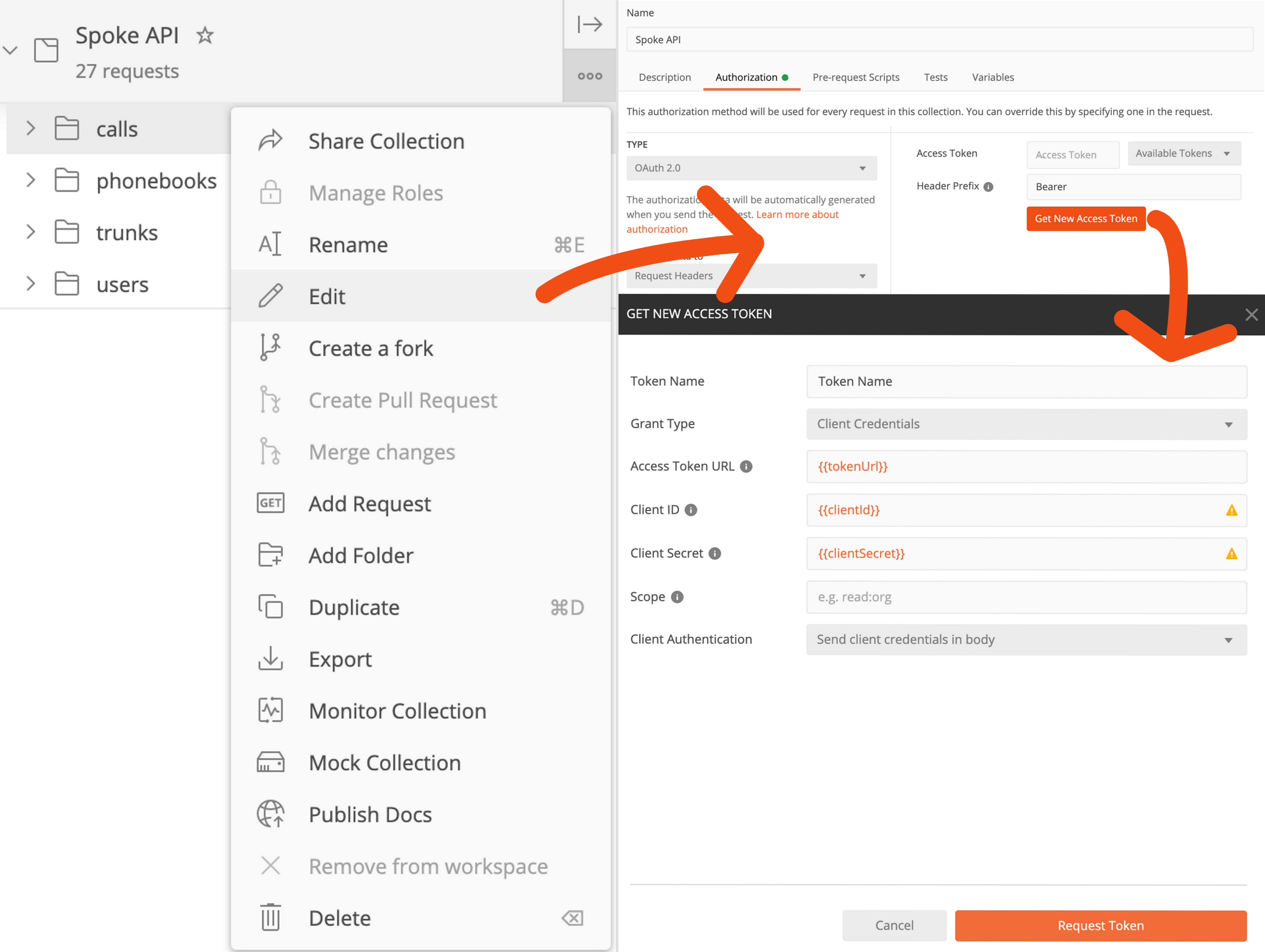
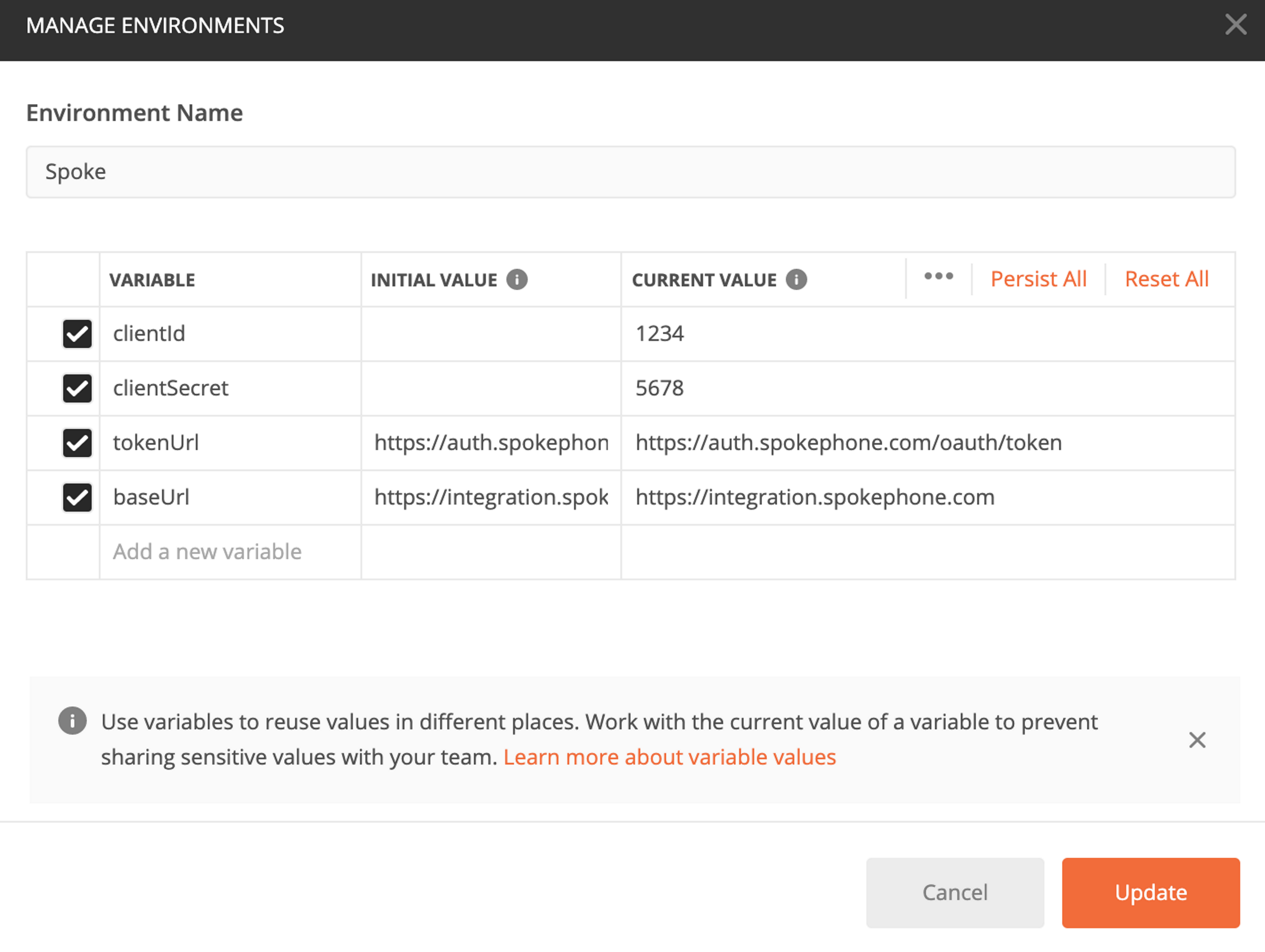
We recommend setting up the following variables in a postman environment clientId, clientSecret, tokenUrl, and baseUrl. To authenticate every request for the postman collection for an hour (the lifetime of an authentication token), you will need to edit the collection Authorization to use OAuth 2.0 with client credentials. Once you have completed this setup you will be able to make any request in the collection, and be authenticated to do so.